Shadow Deployment: How It Works, And Key Considerations
According to the 2025 DORA State of AI-assisted Software Development report, nearly two-thirds of teams report change failure rates above 8%. This means most organizations see roughly one in twelve production changes or more end in degraded service or a rollback. Shadow deployment is one of the few release strategies that can catch these failures before a single user is affected.
This guide covers what shadow deployment is, how it works under real traffic, its benefits and challenges, and a step-by-step breakdown of setting up a foolproof shadow deployment.
What Is Shadow Deployment?
Shadow deployment (or shadow testing) is a software release strategy where a new version of your service runs in parallel with the current production version, receives a copy of live user traffic, and processes it without ever returning a response to the user.
The current version continues to handle every real request and return responses to users. The new version captures and processes the mirrored traffic for internal analysis, so teams can observe how the new code behaves against the exact requests, load patterns, and edge cases that production systems are dealing with in real time.
Shadow deployment is especially important when the cost of a bad release is high and synthetic testing has run its course. This makes it a strong fit for machine learning model updates, latency-sensitive services, and payment or financial systems, where a regression that slips through pre-production testing can carry substantial business or user cost.
How A Shadow Deployment Works Under Real Production Traffic
Shadow deployments rely on a duplication mechanism that sits at the traffic entry point of your system, typically the API gateway, load balancer, or service mesh. This layer takes every incoming request and forks it: one copy goes to the production version, and the other goes to the shadow version.
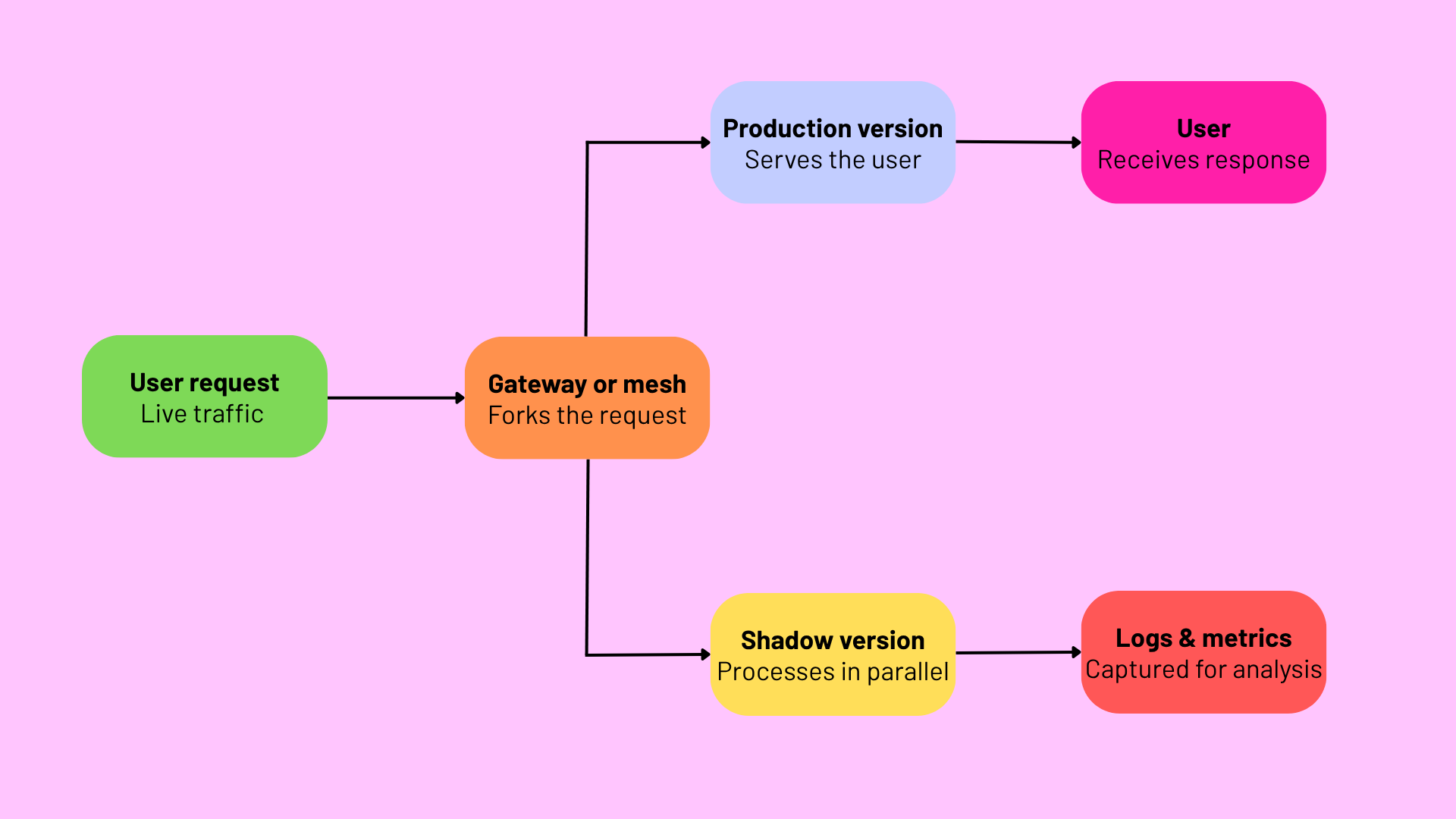
When a request arrives, the gateway forwards it to the production version, which processes it and returns the response to the user. In parallel, an identical copy of that request is sent to the shadow version, which processes it using its own code, dependencies, and configuration.
Whatever the shadow produces, including its response body, latency numbers, and error signals, is captured for logging and then dropped. Comparison against the production output happens off-path, either streamed to a metrics pipeline in real time or batched for offline analysis.
Most production shadow deployments rely on well-established tools for the mirroring layer itself:
- Istio and Linkerd both offer traffic mirroring as a native feature at the service mesh layer.
- Envoy, which underpins Istio, supports it directly through its request mirror policy.
- NGINX and HAProxy can mirror at the reverse-proxy layer.
- AWS VPC Traffic Mirroring handles it at the network layer, replaying packets from production to a test environment without any changes to the application.
What none of these tools handle is the underlying container workloads. The production and shadow versions still need to be deployed, monitored, and eventually promoted or rolled back via a separate container management layer, where a tool like Portainer sits.
How Shadow Deployment Compares To Canary And Blue Green Deployments
Shadow deployment is often grouped with canary and blue-green deployments, but the three strategies solve different problems and expose users to very different levels of risk.
| Strategy | Who sees the new version | Rollout style | Main risk |
|---|---|---|---|
| Blue-green | All users, all at once | Full traffic switch from old to new | Cutover failures affect everyone at the same time |
| Canary | A small percentage of users first, widening over time | Gradual traffic shift | Early users take the hit if something’s wrong |
| Shadow | No users | Mirrored copy of live traffic | Extra infrastructure cost, no user-facing risk |
Blue-green deployment gives you a fast, clean cutover with a full rollback path (flip traffic back to the old environment), but every user experiences the new version at the same moment.
Canary deployment, on the other hand, lets you limit the blast radius by exposing a small group first. You can then widen the rollout as confidence grows, but early users are still real users, and any regressions hit them directly.
Shadow deployment sits in a different category. Because responses from the new version are never returned to users during testing, no one is exposed to the new code at all, no matter how badly it misbehaves. This gives you a high-fidelity signal from real traffic without any user-facing risk.
The trade-offs, however, are the extra infrastructure required to run the shadow and the inability to validate the user experience directly, since no user is in the loop.
In practice, teams often combine these strategies. A common pattern is to run a shadow deployment first to catch regressions and performance problems against real traffic, then move to a canary once confidence in the new version is high enough that limited user exposure is acceptable.
Benefits Of Shadow Deployment
Shadow deployment earns its place in the release toolkit because it exposes a class of problems that no other strategy catches. Some of the key benefits include:
- A test environment that can safely fail: Every response the shadow produces is discarded, so the new version can crash, misbehave, or return corrupted data without any user consequence. Teams can push riskier changes into a shadow than they would ever push straight into a canary.
- Testing against production behavior: The new version sees the same traffic volumes, request patterns, and edge cases that production is handling in real time. Staging environments can’t reproduce this reliably, however carefully they’re built.
- Direct behavioral comparison with the current version: The old and new versions process the same requests in parallel, allowing you to compare their outputs side by side. This catches correctness regressions that pure performance monitoring would miss, cases where the new code returns a technically valid response but a wrong one.
- Accurate performance and load measurement: Running the shadow against real traffic gives you accurate latency, throughput, and resource usage numbers before you commit to the release. If the new version is slower, uses more memory, or encounters an unexpected bottleneck under load, you’ll see it in the metrics even if no one experiences the slowdown.
- Drift detection for machine learning models: For ML rollouts specifically, shadow deployment lets teams run the new model on production inputs and compare its predictions to the current one on the exact same requests. It catches prediction drift, accuracy regressions, and edge-case failures that offline evaluation misses.
Challenges And Considerations Of Shadow Deployments
Shadow deployment removes user-facing risk, but the setup carries its own operational overhead and failure modes. Here are the main ones to plan for:
- Doubled infrastructure footprint: Every mirrored request consumes compute, memory, storage, and network capacity on top of production. For high-traffic services, full mirroring can double the cluster size for the duration of the test. Sampling a percentage of traffic mitigates this, though it also lowers signal fidelity.
- Side effects on external systems: If the shadow calls a payment gateway, sends an email, writes to a shared database, or triggers any external action, users get billed twice, receive duplicate notifications, or see corrupted data. Every downstream call needs to be stubbed, mocked, or routed to a sandbox, and finding all of them in a complex service takes work.
- Noise in output comparison: Timestamps, generated IDs, ordering of collections, floating-point precision, and any non-deterministic behavior produce differences between shadow and production output that aren’t actual regressions. Filtering signal from noise takes engineering effort teams underestimate.
- Observability and monitoring overhead: Dashboards, alerting rules, and log pipelines all need to distinguish shadow from production, or shadow errors pollute production alerts and cause on-call fatigue.
- Data privacy and compliance: The shadow inherits production’s compliance requirements, including GDPR, HIPAA, PCI-DSS, and similar frameworks. It needs equivalent access controls, audit logging, and encryption posture, which teams sometimes only discover mid-project.
- Latency and back-pressure risk at the mirroring layer: If the shadow is slow, unresponsive, or overwhelmed, some mirroring implementations can introduce back-pressure on the production path or drop mirrored requests without warning. Testing the mirroring configuration itself is easy to forget.
- Governance overhead across environments: Without clear ownership and consistent access control across both versions, the shadow can become its own form of shadow IT, running in production but governed outside normal policies.
Overcoming these challenges depends on consistent visibility, access control, and lifecycle management across both versions of the service, which is what a container control plane is designed to handle.
How To Set Up A Foolproof Shadow Deployment
A shadow deployment is straightforward in principle, but going from “we should try this” to running one in production means putting several pieces together in the right order. Here’s a step-by-step approach.
Step #1: Identify The Target Service And Define Success Criteria
Vague criteria are why most shadow deployments stall in analysis paralysis. You need explicit, measurable thresholds that make the go/no-go decision obvious. At a minimum, define acceptance ranges for:
- Latency parity at p50, p95, and p99 percentiles against the production baseline
- Error rate matching or improving on production
- Response correctness above a defined percentage of matched outputs
- Resource usage (CPU, memory, network) within an acceptable delta
Collect a baseline of these metrics from production for at least a week before starting the shadow, so you’re comparing against a representative pattern rather than a single day’s traffic.
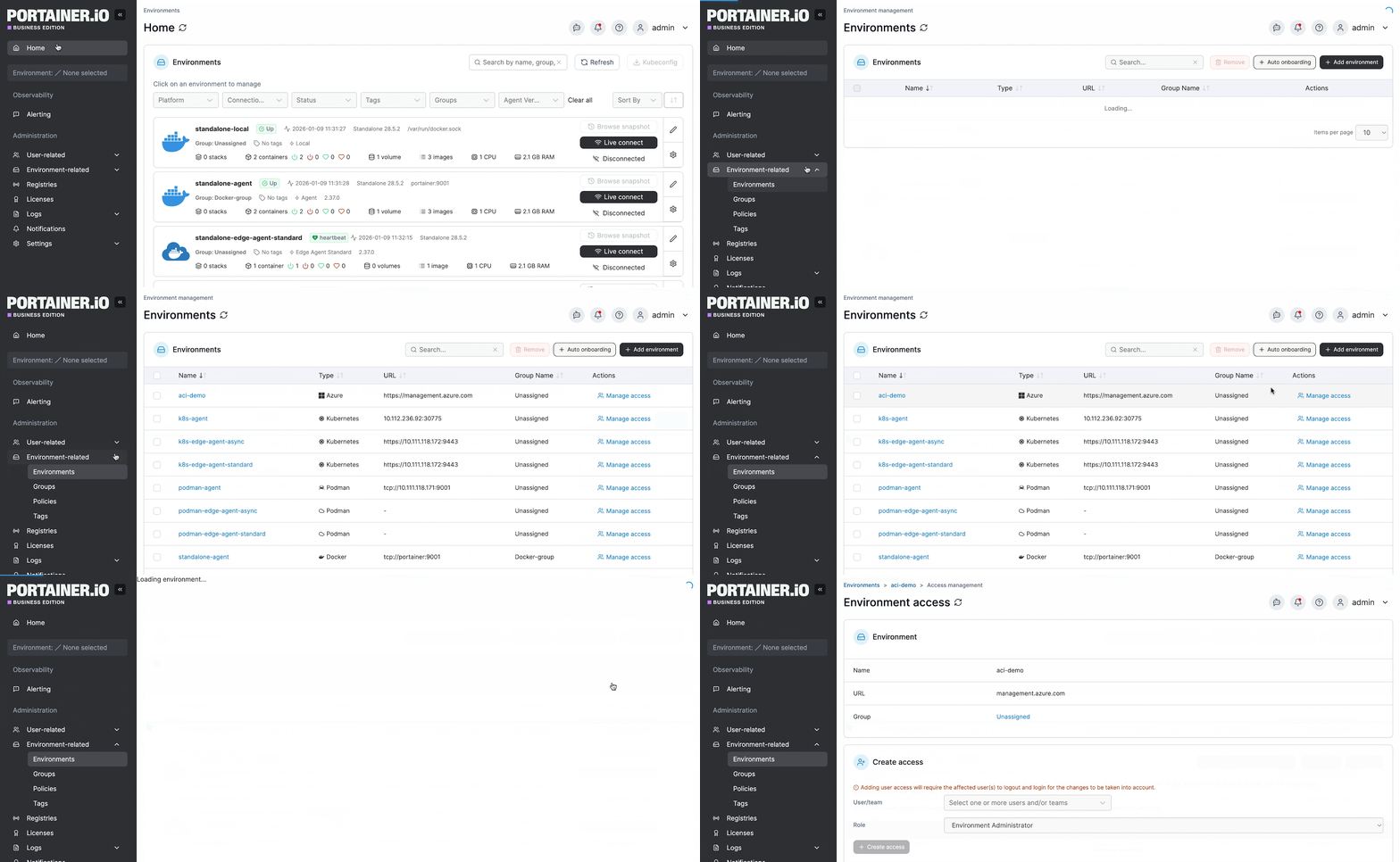
Portainer’s home view gives you a single place to see every environment you’re running, with connection status, container counts, and resource footprint per environment visible at a glance. This is the level of visibility you want in place before you stand up a shadow, so both versions of the workload appear in the same interface once the shadow is running.
Step 2: Set Up The Traffic Mirroring Layer
With criteria set and a baseline captured, configure the mirroring layer you chose earlier to route a copy of production traffic to the shadow endpoint. A handful of configuration choices apply regardless of the tool:
- Rely on async mirroring: Async fire-and-forget mirroring is the default in most modern implementations (Envoy, Istio, NGINX). This means a slow or unresponsive shadow can’t degrade the production response path.
- Tag mirrored requests with a header: Add a header like X-Shadow-Traffic: true to every mirrored request so downstream systems can detect and handle shadow requests differently if needed.
- Start with read-only endpoints: Mirror GET requests before mirroring anything that writes. This limits side-effect risk while you validate the pipeline end-to-end.
- Ramp gradually from a small sample to full mirroring: Start at 5-10% of production traffic and increase from there. This lets you validate the mirroring configuration itself without doubling production load overnight.
Once the mirroring layer is stable and traffic is flowing to both versions, you’re ready to stand up the shadow workload itself.
Step 3: Deploy The Shadow Workload
With traffic flowing through the mirroring layer, the shadow workload itself needs to be deployed alongside production, cleanly isolated so it can’t accidentally receive live requests or interfere with the running version. In practice, this means:
- Same image build pipeline, different tag: Build the shadow from the same CI pipeline that produces production images, but use a distinct tag so the two versions are unambiguous across all downstream systems.
- Dedicated namespace with resource quotas: Deploy the shadow into its own namespace with quotas that cap CPU, memory, and storage. This stops the shadow from crowding out production if it misbehaves under load.
- Per-workload resource limits as a second line of defense: On top of the namespace quota, set explicit CPU, memory, and network limits on the shadow’s deployment spec itself. The namespace quota caps the total; the workload limits cap a single runaway container.
- Network policies restricting outbound traffic: Lock down the shadow’s egress to internal-only endpoints or sandbox equivalents so it can’t reach external services by default.
This is where a container control plane earns its cost.
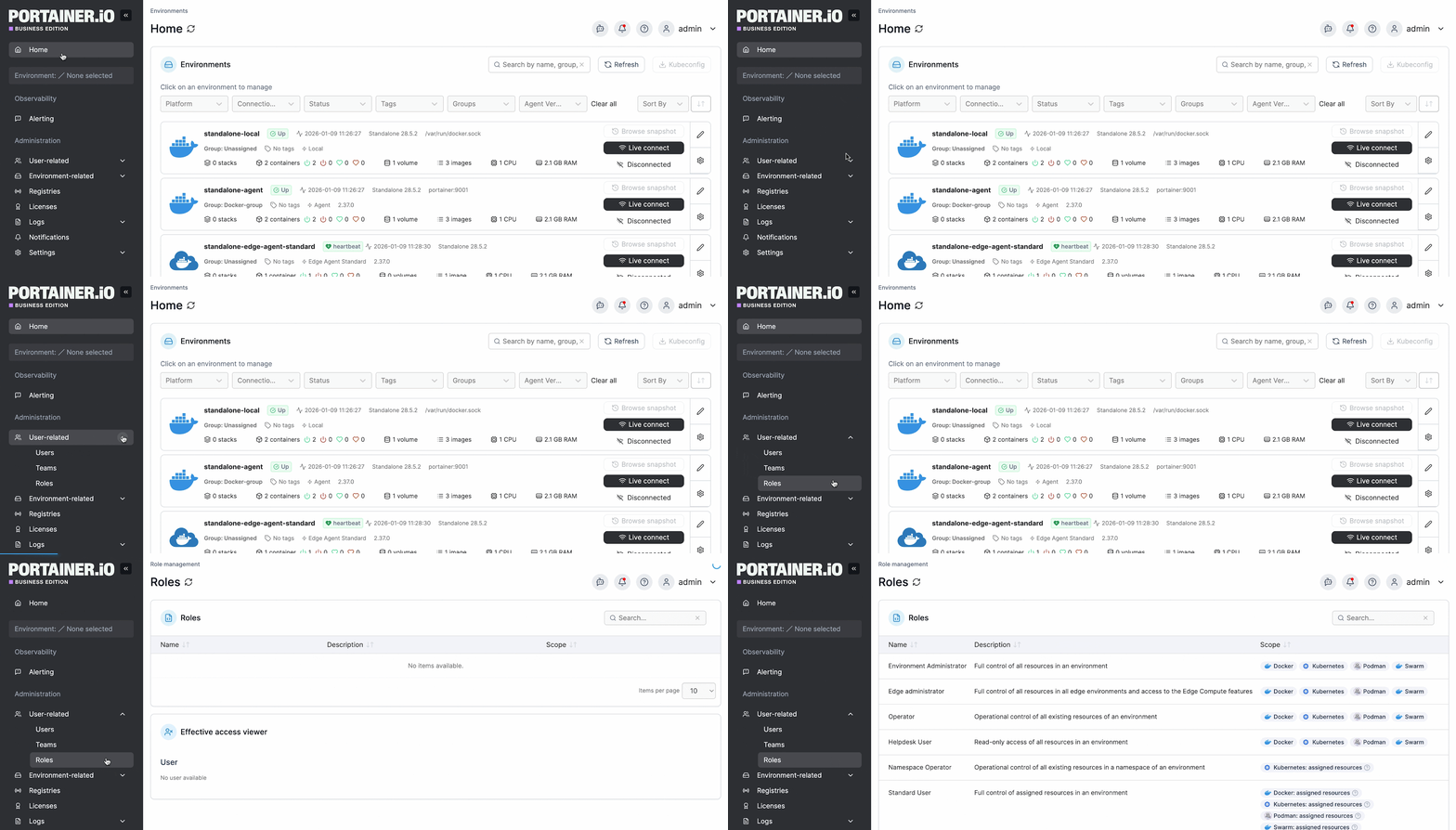
Portainer handles the workload isolation directly. You deploy the shadow into its own namespace, with Kubernetes RBAC controlling who can modify it, apply resource quotas at the namespace level, and manage the deployment through GitOps using a versioned manifest, so every change is traceable.
{{article-cta}}
Step 4: Isolate Side Effects
Even with the shadow running in its own namespace, every downstream call it makes can still reach production systems if you don’t stop it. Side effects come in more forms than teams typically plan for:
- External API calls: Payment gateways, third-party integrations, and any outbound HTTP call that costs money, sends data, or triggers external state changes.
- Database writes: Inserts, updates, and deletes against shared production databases.
- Message queue publishes: Events dispatched to downstream consumers that will act on them as if they’re real.
- Cache writes: Updates to shared caches that other services then read from.
- Notification systems: Emails, SMS, push notifications, and webhooks triggered as a side effect of request processing.
- Analytics and tracking: Events pushed to analytics pipelines that skew reporting numbers.
- Background job triggers: Async jobs the shadow enqueues into shared job queues.
The general mitigation pattern is to route each of these to a sandbox equivalent, a mock, or a null sink for the duration of the shadow. Environment variables and secrets that resolve to different endpoints depending on the deployment target are the cleanest way to do this without code changes.
Portainer manages both ConfigMaps and secrets at the environment level, which lets you keep the shadow’s endpoint configuration separate from production without duplicating manifests or forking application code.
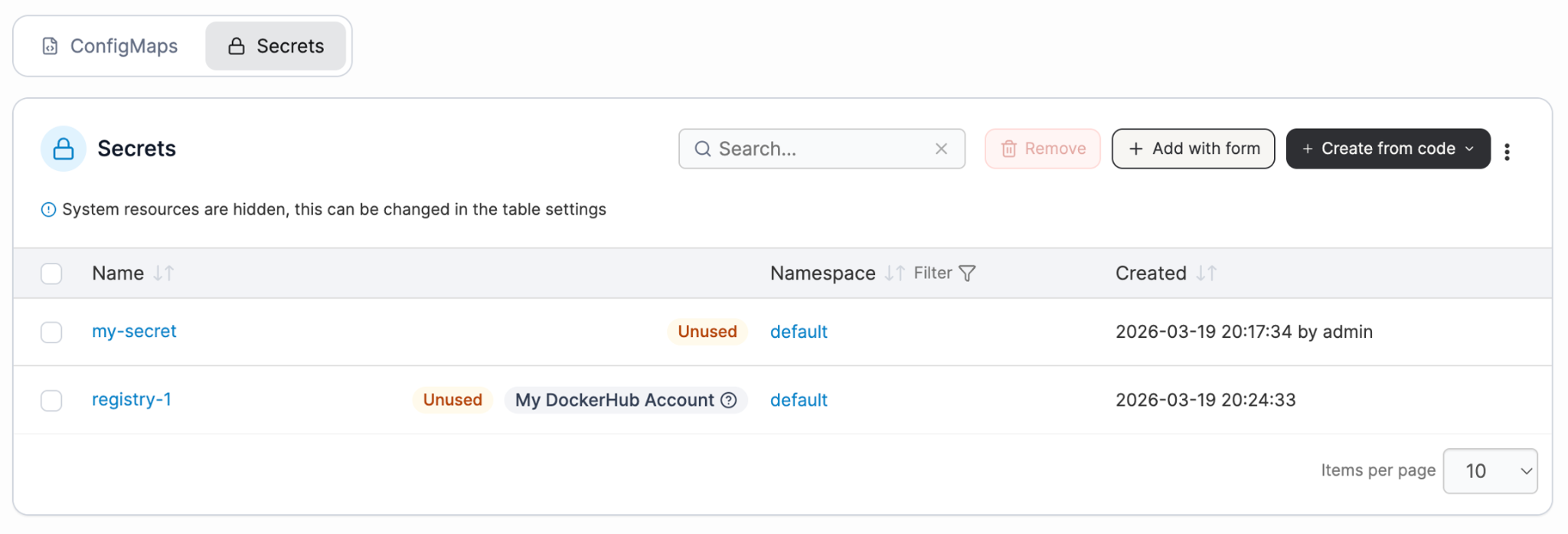
The change history stays auditable through the same GitOps flow used for the deployment itself.
Step 5: Set Up Observability And Comparison
With the shadow running safely, the next problem is making sure you can actually see what it’s doing. Three things need to run in parallel:
- Per-version metrics: Latency at each percentile, error rate, throughput, and resource usage, all tagged with the deployment version so dashboards can compare production and shadow directly.
- Structured output comparison: Whether streamed to a comparison consumer in real time (via Kafka, Kinesis, or similar) or batched from logs offline, this is what catches correctness regressions. Diffy, originally built at Twitter, is a well-known open-source example of this pattern
- Alerting separation: Shadow-tagged alerts route to a different channel than production alerts. This keeps shadow noise out of the production on-call rotation.
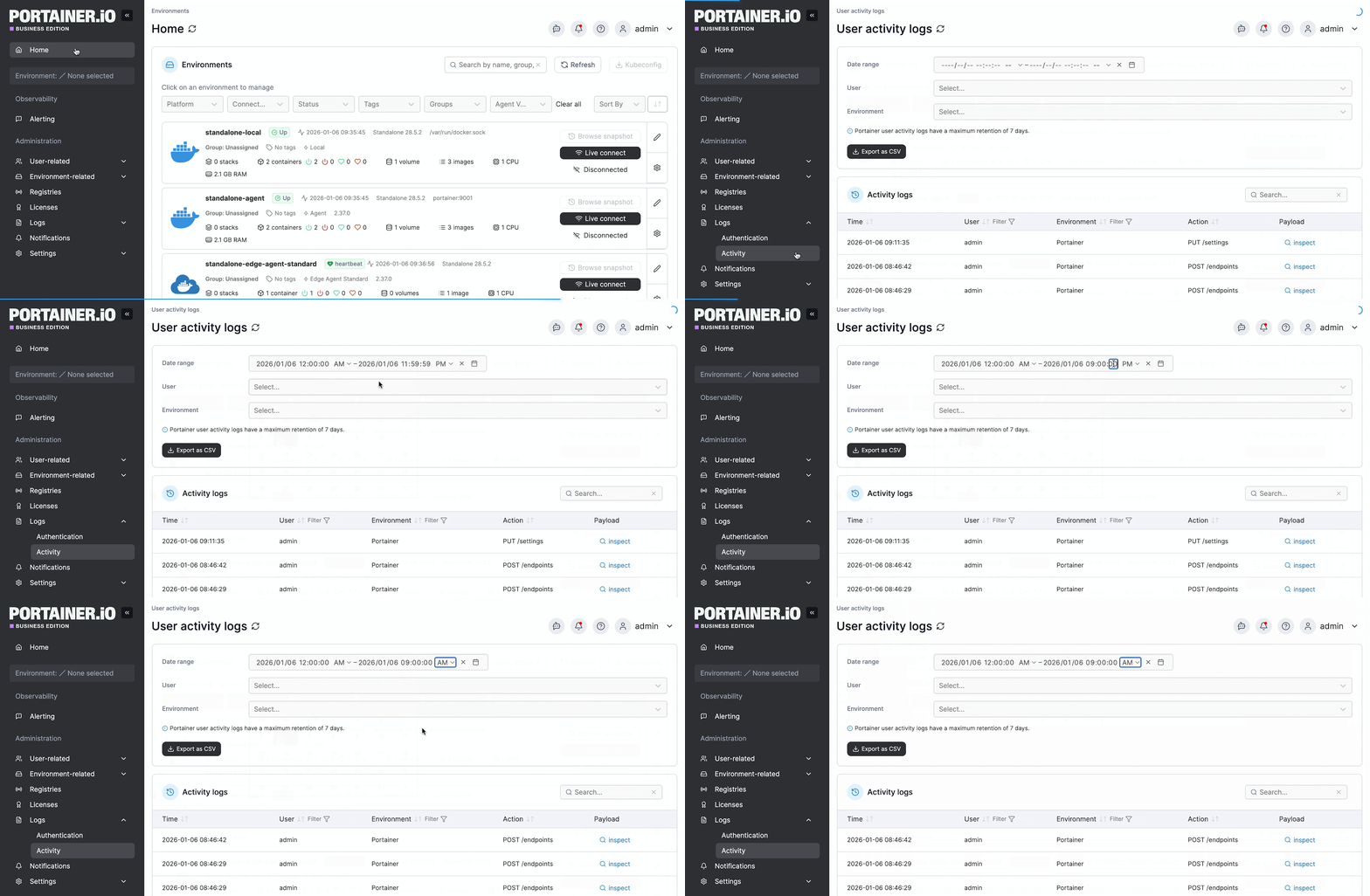
Portainer’s built-in log and metric views cover the shadow’s operational health within the same dashboard as production, including container status, restarts, resource usage, and live log streams for each workload. Deeper metrics and comparison work happen alongside dedicated container monitoring tools like Prometheus, Grafana, and Diffy.
Step 6: Analyze Results, Promote Or Roll Back
Once the shadow has processed enough traffic to be statistically meaningful (days rather than hours for most services, and weeks for low-volume or highly variable workloads), compare the results against the success criteria from Step 1.
If the shadow meets or exceeds them, promote the new version to a canary or a full rollout. If it doesn’t, use the shadow’s logs and comparison output to diagnose failures, fix the code, and iterate before any users see the new version.
The promotion itself is as much a governance moment as a technical one. Someone needs to sign off, the change needs to be traceable, and the rollback path needs to be one action away.
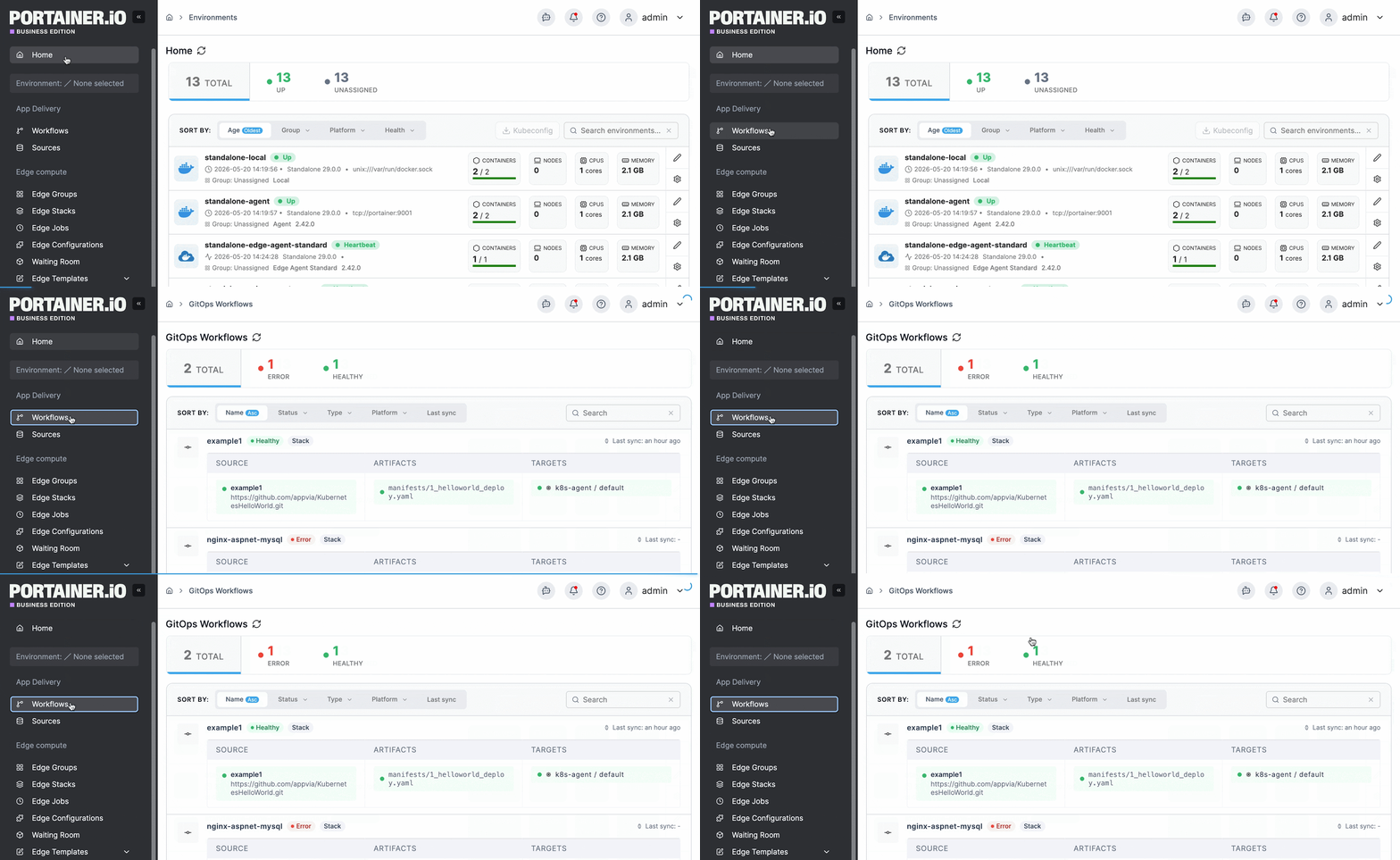
Portainer handles this through the same GitOps workflow you used to deploy the shadow. Promotion is a manifest change, versioned and auditable, gated by permissions on who’s authorized to promote, and reversible through the same interface.
Nothing here is complicated in isolation. Doing all six steps with discipline is what separates a shadow deployment that pays for itself from one that becomes another source of operational drag.
Run Shadow Deployments With Confidence Using Portainer
Shadow deployment turns risky releases into observable ones. The mechanism is simple in principle, but its operational reality requires a control plane.
Portainer is a container management platform that gives you exactly that. It runs the operational layer under the shadow, so both versions live in the same interface and every promotion or rollback is a single traceable action. You get enterprise-grade isolation, RBAC, and audit without the platform-team overhead that running two parallel production workloads usually demands.
It’s also self-hosted, so the control plane governing both workloads sits inside your own infrastructure, which matters when the shadow inherits production’s compliance obligations. And because Portainer is vendor-agnostic, it runs that operational layer regardless of which mirroring stack you’ve chosen or where your clusters sit, so adopting shadow deployments doesn’t commit you to a single vendor’s toolchain.
Want to see how Portainer handles shadow deployments across your Kubernetes environments? Get a demo and see it running against your own setup.
{{article-cta}}
FAQs
1. Does Shadow Deployment Affect Users?
No. Since the shadow’s responses are never returned to users, a broken shadow can’t degrade the user experience or cause an outage. Users only ever see responses from the stable production version.
2. What Tools Are Used For Shadow Deployment?
Traffic mirroring runs on service meshes (Istio, Linkerd) or gateways (Envoy, NGINX, HAProxy, AWS VPC Traffic Mirroring). Portainer manages the container workloads underneath, handling deployment, RBAC, observability, and promotion for both versions.
3. Is Shadow Deployment The Same As A/B Testing?
No. A/B testing splits real users between two versions to compare user behavior. Shadow deployment mirrors traffic to a non-serving version to compare technical behavior; no user sees the shadow’s output.
4. When Should You Use A Shadow Deployment?
Shadow deployment is best suited for high-stakes releases where regressions carry substantial business or regulatory cost, including ML model updates, payment systems, and latency-sensitive services. Portainer makes running one operationally sustainable across Kubernetes environments.
One platform, not twelve tools.
Govern Kubernetes across your whole fleet from a single control plane. Get 3 nodes free.
Get 3 nodes freeTalk to technical sales