Multi Cluster Kubernetes Configuration Management Guide
Key takeaways
- Managing Kubernetes configuration is the highest-leverage part of running a cluster fleet, and the part most likely to break under pressure.
- Helm handles packaging, Kustomize handles environment overlays, and GitOps controllers like Argo CD or Flux handle delivery and reconciliation, so most mature teams end up combining them rather than picking one.
- Handling configuration drift across multiple clusters comes down to making Git the only place changes happen, letting a reconciliation controller enforce it, adding cross-cluster visibility on top, and building the review discipline that keeps everyone accountable.
- The order you set things up in matters more than the tools you pick: repo structure first, then manifests, then Secrets out of Git, then reconciliation, then a management platform, and finally delegation and access boundaries.
- Portainer gives platform teams one place to manage every cluster they run, adding built-in RBAC, audit trails, and namespace-scoped delegation on top of whatever Helm, Kustomize, or GitOps setup they already use.
According to Red Hat’s 2026 State of Cloud-Native Security report, 78% of organizations reported at least one misconfiguration in their cloud-native environments over the past 12 months, making it the single most common type of security incident they dealt with.
For most platform teams running Kubernetes, this number makes complete sense once you look at how the day-to-day looks like: a ConfigMap patched during an incident and never reconciled with Git, a Secret copied between namespaces to unblock a release, an RBAC role granted “just for now” that ends up outliving the engineer who added it.
Kubernetes configuration management is what stops these small decisions from turning into next quarter’s outage or audit finding.
This guide covers the approaches teams use to manage Kubernetes configuration, the challenges of running more than a handful of clusters, and how a platform like Portainer helps keep configuration consistent across all of them.
What Is Kubernetes Configuration Management?
Kubernetes configuration management is the practice of defining, storing, versioning, and applying every setting your applications and clusters depend on to run correctly. Basically, it’s how you make sure your clusters behave the way you want them to, everywhere they run.
Instead of clicking through a UI or editing live resources whenever something needs changing, you write the desired state down in a file, commit it to a repo, and let Kubernetes reconcile reality to match what you wrote.
There are two layers most teams end up managing, and it’s worth keeping them separate:
- Application configuration. This is what your workloads need to run: ConfigMaps for non-sensitive settings, Secrets for credentials, environment variables, and feature flags.
- Cluster and platform configuration. This is what the environment itself needs to behave correctly: RBAC for Kubernetes, resource quotas, network policies, admission controllers, and ingress settings.
Both layers follow the same declarative model, which is a big part of what makes Kubernetes easier and more powerful once you get used to it: the file is the source of truth, and the cluster is the reflection.
Why Kubernetes Configuration Management Matters
Configuration is the highest-leverage part of running Kubernetes and, ironically, the part most likely to be handled by whoever’s on-call at the time. Here are a few reasons this becomes a problem worth solving properly:
1. It’s the Leading Source of Incidents
Red Hat’s 2026 State of Cloud-Native Security report found that 74% of organizations have slowed or delayed application deployments in the last 12 months because of security concerns, and misconfigured infrastructure was the incident type they hit most frequently.
When configuration isn’t managed with the same rigor as application code, you tend to see the same handful of things go wrong:
- ConfigMaps with the wrong environment variable pointing at the wrong backend
- Secrets sitting in Git in base64
- RBAC bindings that granted more permissions than the ticket asked for
- Admission policies disabled during a debug session and never re-enabled
2. Sprawl Grows With Every Cluster You Add
The more clusters you add, the more places configuration can diverge without anyone noticing. Every new environment (dev, staging, prod, plus regional replicas, plus edge, plus customer-dedicated clusters) multiplies the number of ConfigMap, Secret, and RBAC files that need to stay in sync.
Teams that started by hand-editing YAML in a single cluster often keep those habits well past the point where they scale, and the result is a fleet where the “same” application is running with slightly different settings in each cluster.
This stops being a Kubernetes problem and becomes a configuration management one, which usually only becomes visible once you’re too deep in to fix it easily.
3. Compliance Assumes You Can Answer “Who Changed What, When”
Versioned and auditable configuration is the baseline expectation of every compliance framework worth naming, including ISO 27001, SOC 2, HIPAA, PCI-DSS, and GDPR. The EU Cyber Resilience Act is now on that list too, and 64% of organizations in Red Hat’s 2026 survey expect it to influence their cloud-native security investments.
If your config is in Git with a clean commit history, an auditor’s question (“who changed the RBAC binding on the production cluster last quarter?”) has a one-line answer.
If it’s in kubectl edit and Slack threads, the same question takes days to piece together from logs and memory.
Portainer’s approach to Kubernetes governance covers this in more depth, but the short version is that compliance and configuration hygiene are the same discipline, just dressed differently.
Kubernetes Configuration Management Approaches Compared
There’s no single “right” way to manage Kubernetes configuration. Most teams end up combining a few of these approaches, and the choice comes down to how many clusters you’re running, how much of your team lives in YAML, and how much operational overhead you can absorb.
Here’s how the main approaches stack up.
| Approach | Best For | Multi-Cluster Friendliness | Where It Falls Short |
|---|---|---|---|
| Native primitives (ConfigMaps, Secrets, raw YAML) | Single clusters, learning Kubernetes, small teams | Poor | No templating, no environment overlays, Secrets aren’t actually encrypted |
| Helm | Packaging complex applications, distributing third-party workloads | Fair with per-cluster values files | Templating logic gets complex fast, values.yaml sprawl across environments |
| Kustomize | Environment-specific overlays without templating | Good | Overlay files multiply, no packaging or sharing model |
| GitOps (Argo CD, Flux) | Automated reconciliation, audit trails, multi-cluster delivery | Excellent | Adds operational overhead, needs disciplined Git workflows |
| UI-based management platforms (e.g. Portainer) | Cross-cluster visibility, delegated access, mixed-skill teams | Excellent | Depth varies by platform |
1. Native Primitives: ConfigMaps, Secrets, and Raw YAML
This is the baseline everything else builds on. Here, you write YAML, apply it with kubectl, and Kubernetes does what you told it to.
For a single cluster and a small team, this approach is completely workable, but things start to break as soon as you need to manage more than one environment.
There’s no built-in way to say “same manifest, different image tag for staging” without duplicating files or wrapping things in shell scripts. Kubernetes secrets stored this way are base64-encoded, so they either sit in Git as a security liability or in cluster-only state that’s hard to audit.
2. Helm
Helm is Kubernetes’ package manager, and it solves two things well:
- Templating manifests so the same chart can run in different environments with different values.yaml
- Packaging applications so they can be installed with a single command
It’s the reason most third-party workloads (databases, ingress controllers, observability stacks) are distributed as Helm charts.
The tradeoff is that as your charts get more complex, the templating logic starts to feel like a mini programming language embedded in your YAML, and debugging a broken chart usually means running helm template and reading the rendered output line by line.
Teams running Helm across many clusters also run into a values-file sprawl problem: one file per environment, per region, per tenant, and no easy way to see what’s different between them at a glance.
Helm is the right tool for packaging, but it isn’t the whole answer if you’re looking to manage configuration at scale.
3. Kustomize
If you like the idea of environment-specific configuration but don’t want to buy into Helm’s templating model, Kustomize is a solid alternative. Instead of templates, it uses overlays: you write a base manifest, then patch it for each environment on top. It’s built into kubectl (via kubectl apply -k), so there’s nothing extra to install.
The catch is that overlay files multiply the same way values.yaml files do, and Kustomize doesn’t have a packaging or sharing story, so you can’t distribute a Kustomize setup the way you’d distribute a Helm chart. It’s great for your own applications, but less useful for anything you want to share across teams or projects.
A lot of mature teams end up running both, with Helm for third-party workloads and Kustomize for their own applications.
4. GitOps with Argo CD and Flux
Next up is GitOps, which sits at a different layer to everything above.
You can continue to author your manifests in Helm, Kustomize, or raw YAML, but instead of applying them with kubectl, you commit them to Git and let a controller such as Argo CD or Flux reconcile the cluster to match.
The upside here is huge. Every change now goes through a PR, which gives you a review step and an audit trail. You can detect drift automatically because the controller is constantly comparing cluster state to what’s in Git. And rolling out the same config to dozens of clusters is a matter of pointing dozens of controllers at the same repo.
The tradeoff with this one is the operational overhead. You’re now running additional controllers, managing their access to Git, and building the discipline for a Git-first workflow across the whole team.
For teams already in that mindset, GitOps is the strongest option for multi-cluster consistency. For teams still catching up on Kubernetes basics, it can be a bridge too far.
Wondering how a management platform stacks up against a dedicated GitOps controller? Portainer vs Argo CD vs Flux CD breaks down the tradeoffs.
5. UI-Based Management Platforms
Each of the four approaches above operates on the manifest layer: how you author, package, and deliver YAML. But none of them give you a unified view of what’s actually running across your cluster estate, which is where a UI-based management platform like Portainer fits in.
You get a single interface to view, edit, and govern configuration across every cluster you run, whether those clusters are on-prem, in the cloud, or at the edge.
This doesn’t necessarily replace Helm, Kustomize, or GitOps, but gives your team a way to see what’s actually deployed, who has access to what, and where configuration is drifting, without having to kubectl into each cluster individually.
You can also handle the things that native tooling makes painful: RBAC across clusters, namespace-scoped delegation, and audit logging that satisfies compliance without extra tooling.
Kubernetes runs alongside Docker and Swarm from the same interface, configuration reconciles from Git repos (so it works with GitOps workflows rather than against them), and platform teams get the cross-cluster visibility that CLI-based tooling doesn’t offer.
Want the broader picture of how orchestration and management tools fit together? Our Kubernetes Orchestration & Management Tools guide covers where the typical Helm, Prometheus, and GitOps stack fragments in production, and how full management platforms like Portainer, Rancher, and Nutanix Kubernetes Platform compare.
{{article-cta}}
How Companies Handle Configuration Drift Across Multiple Kubernetes Clusters
Configuration drift is what happens when the state running in your clusters stops matching the state defined in Git (or wherever your source of truth lives).
One cluster gets patched by hand during an incident and never reconciled back, another has a Helm chart bumped without the values file being updated in the repo, and a third ends up with a rollout that half-completed and got forgotten. Across a fleet of clusters running the same application, small deviations like these add up to a situation where nobody can confidently say what’s deployed where.
For teams running Kubernetes at any serious scale, drift stops being an “if” and starts being a “how fast can we catch it.” Here’s how most companies handle it in practice:
- Make Git the only place configuration can change. Every change goes through a PR, and anyone who patches a cluster directly reconciles it back to the repo afterward. Some organizations remove direct write access to production clusters entirely.
- Let a reconciliation controller enforce it. Argo CD or Flux continuously compares live state to Git and either flags the difference or corrects it, so the discipline gets enforced by tooling rather than by memory.
- Add a management platform for fleet-wide oversight. While reconciliation controllers handle drift cluster by cluster, they don’t give you a view across the whole estate. A platform like Portainer gives you one place to see which clusters are in sync, which are drifting, and who has access to what.
- Enforce the review discipline that keeps everything above working. Emergency patches are expected to be followed by same-day PRs, and direct cluster access stays reserved for genuine emergencies. Without this, teams route around the tooling under pressure and drift creeps back in.
Step-by-Step Framework for Managing Kubernetes Configurations Across Clusters
Setting up multi-cluster configuration management well is mostly about doing things in the right order. Here’s the sequence that saves the most pain:
Step 1: Decide Your Source-of-Truth Repo Structure Before You Commit Anything
Before you write your first manifest, pick a repo layout and stick to it. It’s the decision teams skip early and regret later. There are three common layouts to choose from:
- One repo per cluster. Cleanest isolation, but painful past a handful of clusters because every change has to be promoted through a separate PR per repo.
- One repo per environment (dev, staging, prod). Good for teams organized around environments, but multi-cluster within an environment can get messy.
- Monorepo with a directory per cluster. Most flexible for multi-cluster and easiest to see differences at a glance, but it needs a disciplined directory structure and defined ownership rules to avoid teams stepping on each other.
For platform teams running more than five clusters, the monorepo approach with a clusters/ directory tends to work out best, but the important thing is to decide early. Restructuring a config repo after a year of accumulated manifests will most definitely become a project you’ll wish you started sooner.
Step 2: Standardize Your Manifest Layer and Commit to It
Pick one primary tool for authoring manifests and use it consistently. You may be tempted to mix raw YAML, Helm, and Kustomize across the same repo, but that’s also how you’ll end up with three different ways to change the same setting. And spoiler alert: none of them will fully work.
Here’s a combination worth considering:
- Helm for third-party workloads like databases, ingress controllers, and observability stacks
- Kustomize for your own applications, where overlays are easier to reason about than templates
- Raw YAML reserved for one-off cluster bootstrapping, nothing production-critical
Whatever combination you pick, document the rule, enforce it in code review, and stay consistent.
Step 3: Get Secrets Out of Git From Day One
Secrets in Git as base64 are one of the fastest ways to fail an audit, or turn a repo leak into a breach. And this isn’t a niche problem either. Wiz’s 2025 Kubernetes Security Report found that 81% of EKS clusters still rely on deprecated ConfigMap authentication, against AWS’s own security best practices.
Solve this before you have anything running in production, because retrofitting it later means rotating every credential you’ve committed.
Depending on where you’re running, here are two patterns worth considering:
- External secret managers like HashiCorp Vault, AWS Secrets Manager, Azure Key Vault, or GCP Secret Manager, paired with a controller like External Secrets Operator that syncs them into cluster Secrets at runtime. Works across clouds and on-prem.
- Sealed Secrets or SOPS if you need the manifest itself to stay in Git, encrypted with a cluster-side key so only the target cluster can decrypt it.
Whichever route you pick, the rule stays the same: raw secret values never enter the repo.
Step 4: Set Up Reconciliation Early
Now that you have Git as the source of truth and secrets out of the repo, the next thing to do is install a reconciliation controller like Argo CD or Flux.
Do this as soon as you add a second cluster to your setup. It’ll be much easier to build the Git-first workflow into a team’s habits when they only have one or two clusters to think about. Once drift has already spread across a fleet, it gets exponentially harder, since you’ll have to manually untangle changes one cluster at a time before the controller can enforce anything.
For the setup itself, you’ll typically run one controller instance per cluster (or one per environment, depending on scale), pointed at the relevant directory in your monorepo. Sync policies are usually configured based on risk tolerance, so production tends to get manual sync while everything else auto-syncs.
Step 5: Add a Management Platform Once You’re Past a Handful of Clusters
Reconciliation controllers give you enforcement, but they don’t give you a view. Once you have more than a handful of clusters running Argo CD or Flux, checking on the state of the fleet through the CLI or per-cluster dashboards turns into its own operational tax.
This is where a platform like Portainer earns its place. It sits above your reconciliation setup and gives platform teams one place to manage every cluster, whether they’re on-prem, in the cloud, or at the edge, with cross-cluster RBAC, namespace-level delegation, and an audit trail that stays with the rest of your governance.
{{article-cta}}
Step 6: Set Up Delegation and Access Boundaries Before You Need Them
The last step is people. Even a well-configured cluster fleet falls apart if every engineer has full write access to every cluster. Before you onboard the next team, decide who can do what:
- Platform team gets full access to cluster and namespace-level resources
- Application teams get write access only to their own namespaces, with read access elsewhere
- Auditors and compliance get read-only access across everything, no write access anywhere
Configure this at both the cluster RBAC layer and the management platform layer, so a mistake in one doesn’t turn into an incident in the other.
Best Practices for Kubernetes Configuration Management
Once the setup is in place, staying healthy comes down to a few ongoing habits:
- Enforce the Git-first rule at the team level. Automated checks can flag violations, but they can’t stop an engineer from bypassing them under pressure. Every direct cluster edit needs a same-day PR to reconcile it, and repeated bypasses need to surface in team reviews.
- Test configuration changes before they merge. A PR review that only reads YAML is missing half the picture, so run kubectl diff against the target cluster, lint Helm charts with helm lint, and validate against your policy engine (OPA Gatekeeper, Kyverno) before approving anything.
- Keep environments in structural parity. Dev, staging, and prod should differ only in scale and secret values, never in configuration structure. When the shape of a manifest diverges between environments, production ends up behaving in ways no other environment could have predicted.
- Diff manifests across clusters proactively. Compare what’s running in equivalent clusters (prod-us-east vs prod-eu-west, for example) and investigate any differences you didn’t expect. It’s the fastest way to catch divergence that reconciliation missed or that reviewers approved without noticing.
Use Portainer to Simplify Kubernetes Configuration Management
Everything covered in this guide (repo structure, standardized manifests, secrets handling, reconciliation, delegation, ongoing hygiene) works. It also assumes your team can hold all of it in their heads while running dozens of clusters through a terminal.
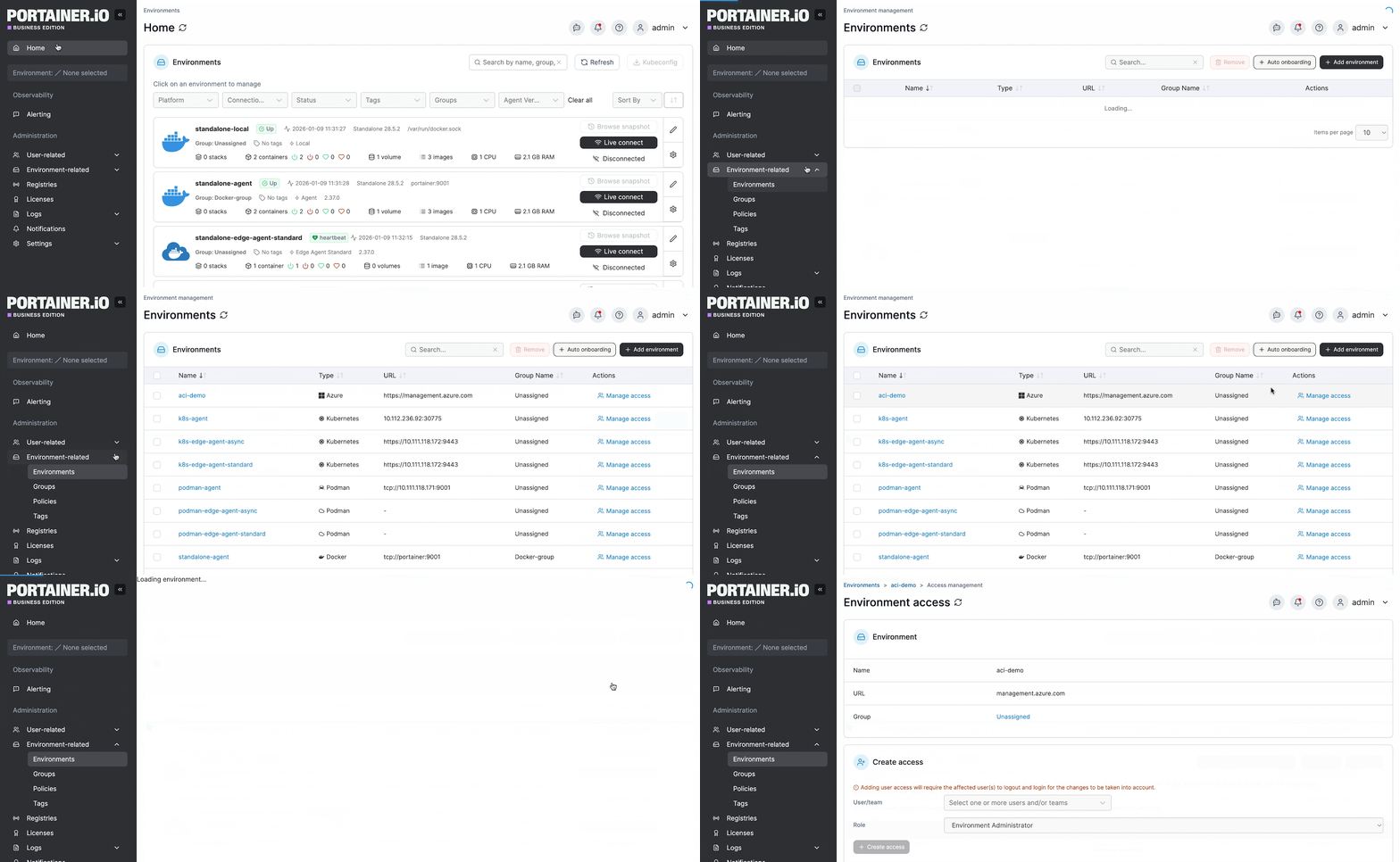
That’s where Portainer fits in. It’s a container management platform that gives platform teams a unified view across every Kubernetes, Docker, and Swarm environment they run, on-prem, in the cloud, or at the edge. Instead of context-switching between kubectl, per-cluster dashboards, and Argo CD or Flux UIs, you see the whole estate in one place, with the configuration state, access model, and audit trail visible together.
How It Maps to What Configuration Management Actually Struggles With
Most of the friction covered in this article comes down to the same handful of operational problems. Portainer addresses them directly:
- Multi-cluster access across data centers and clouds. One control plane manages every cluster you connect, regardless of where it runs (no per-cluster kubeconfigs, no jumping between AWS, Azure, and on-prem consoles).
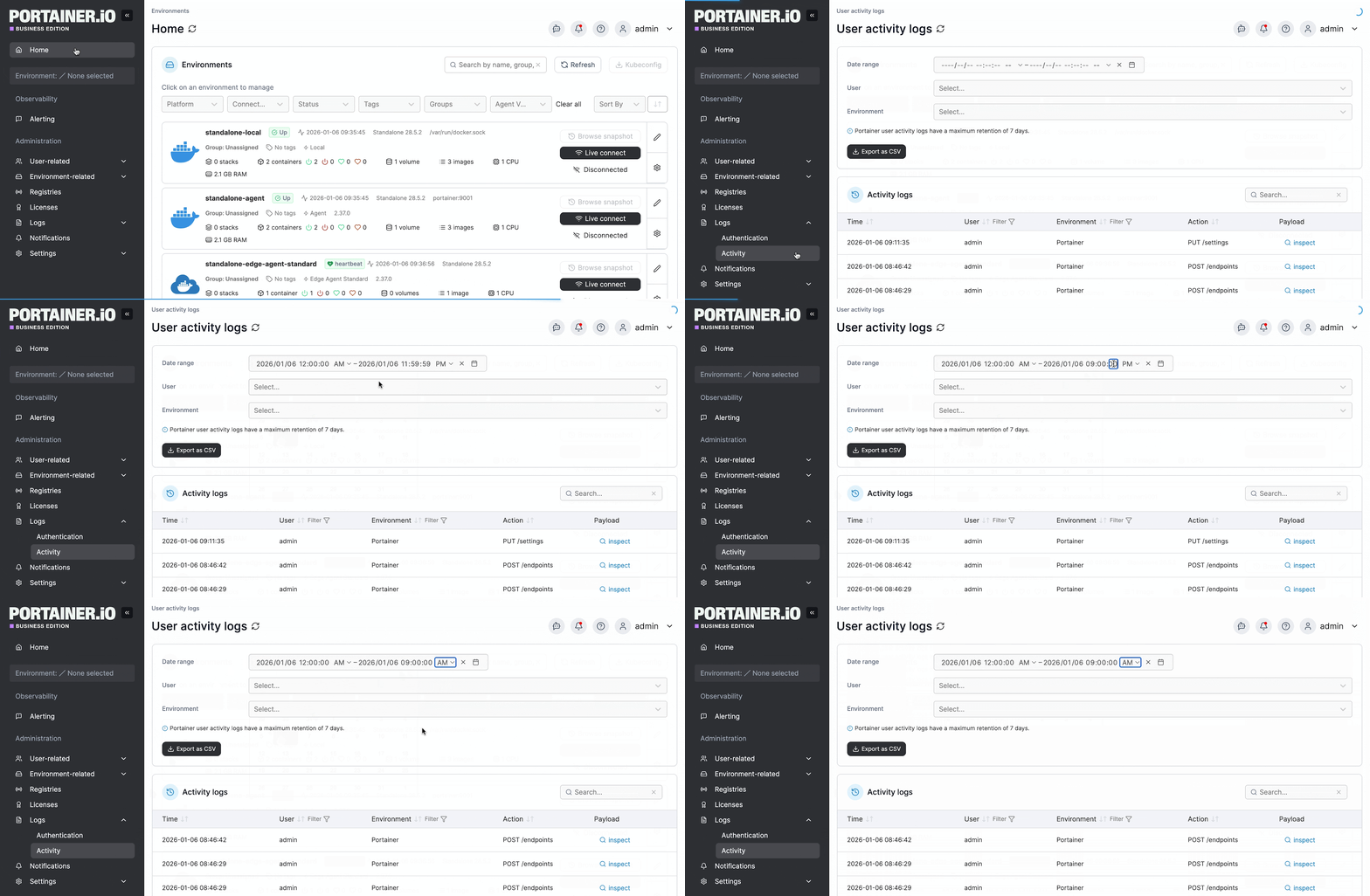
- Visibility and audit trails across every cluster. Every resource, deployment, and change is visible in one interface, with a full audit log of who did what, when, and where. Authentication, user actions, and cluster activity can also be streamed to your SIEM (Sentinel, Splunk, or any Syslog target) for compliance reporting.
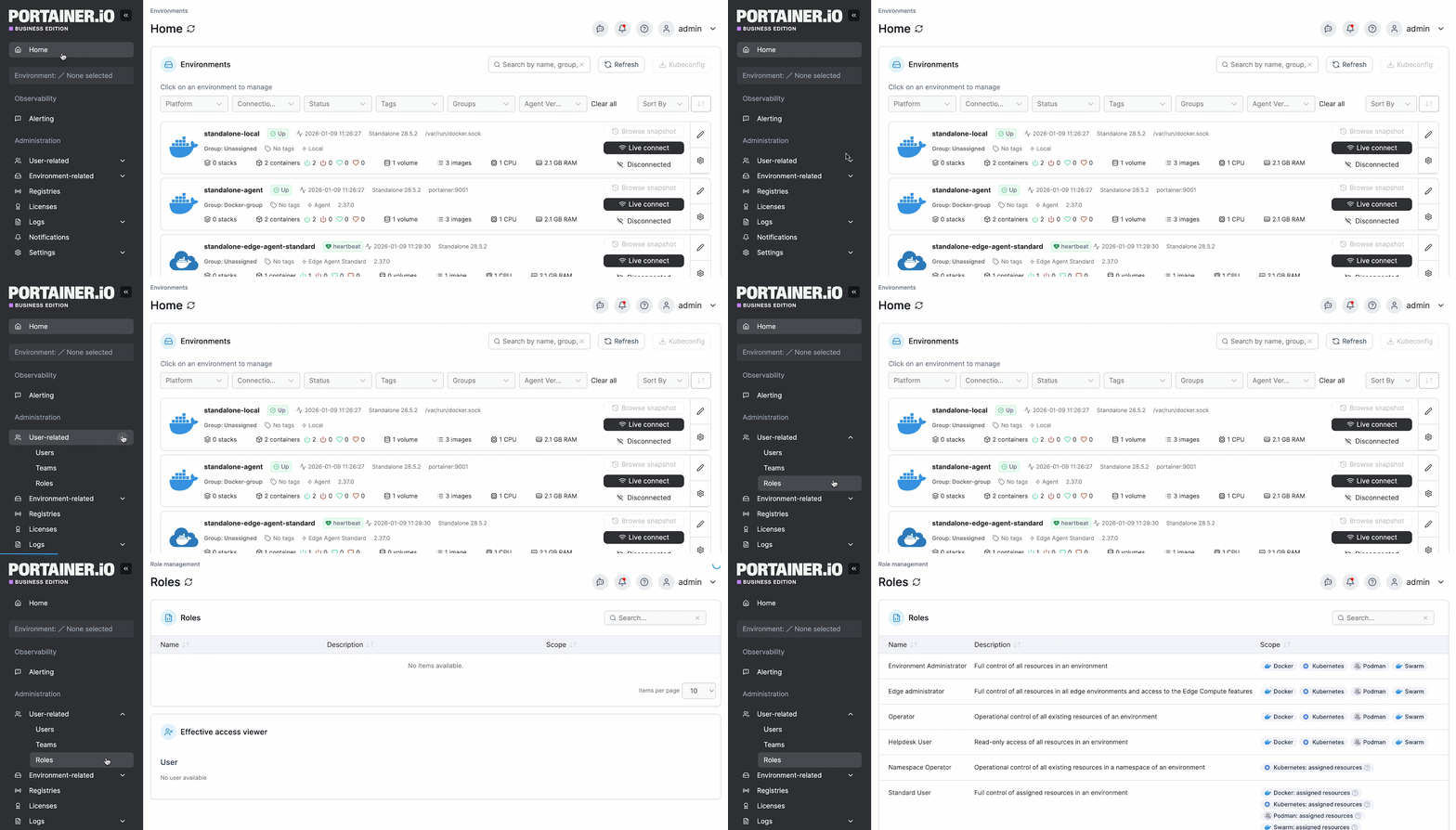
Least-privilege access without the RBAC verbosity. Portainer’s RBAC model maps to your identity provider (LDAP, Active Directory, OAuth) and enforces the most restrictive role by default. Teams can be scoped to specific namespaces without hand-writing role bindings for every cluster.
- Key-person infrastructure risk. When your setup lives in a UI any platform engineer can navigate, the person who built it isn’t a single point of failure. New team members onboard through the interface instead of through tribal knowledge.
How It Fits Alongside Your Existing Setup
Portainer sits at the interaction and governance layer of the stack. It works alongside whatever authoring and delivery tools you already use, pulling configuration from your Git repos and adding cross-cluster visibility, RBAC, and audit on top. Nothing gets ripped out, and if you’re not yet running GitOps, Portainer can be your entry point.
The practical result for platform teams is a shorter mental map. Instead of one engineer holding the state of thirty clusters in their head, that state lives in the interface.
On-call handoffs get shorter, new hires get productive faster, and application teams can deploy safely inside their scoped namespaces without direct cluster access, which means fewer tickets to the platform team and fewer accidental production incidents.
Take Control of Your Kubernetes Configuration with Portainer
Managing Kubernetes configuration across multiple clusters is less about picking the perfect tool and more about building the right discipline around the ones you already use. Git as the source of truth, standardized manifests, secrets kept out of the repo, reconciliation running from day one, and cross-cluster visibility layered on top.
Portainer is a container management platform that gives platform teams one place to manage every Kubernetes, Docker, and Swarm environment they run. It handles the cross-cluster RBAC, audit, and governance that CLI-based tooling leaves you to piece together, and gives teams that aren’t yet running GitOps a straightforward way to get there. For teams past their first handful of clusters, it's the piece that turns a working setup into a maintainable one.
Book a demo with our team to see how Portainer fits into your environment.
FAQs
1. What Is Kubernetes Configuration Management?
Kubernetes configuration management is the practice of defining, versioning, and applying every setting your applications and clusters need to run correctly, from ConfigMaps and Secrets to RBAC, network policies, and Helm charts. The goal is to keep all of it consistent, auditable, and reproducible across every cluster in your fleet.
2. Is a ConfigMap Secure Enough for Passwords?
No. ConfigMaps store data as plain text and aren’t designed for sensitive values. Passwords, API keys, and other credentials belong in Secrets, and ideally an external secret manager like HashiCorp Vault or AWS Secrets Manager.
3. Helm or Kustomize, Which Should I Use?
It depends on what you’re managing. Helm is the right choice for packaging complex applications or distributing third-party workloads like databases and ingress controllers. Kustomize is better for environment-specific overlays on your own applications without templating overhead. Most mature teams end up running both.
4. How Do Companies Deal with Configuration Drift Across Multiple Kubernetes Clusters?
Companies handle drift with a combination of Git-first discipline (every change goes through a PR, no direct kubectl edit), reconciliation controllers like Argo CD or Flux that continuously compare live state to Git, and a management platform like Portainer layered on top for cross-cluster visibility and audit trails.
5. Does GitOps Replace ConfigMaps and Secrets?
No. GitOps is a delivery mechanism, not a configuration primitive. You still use ConfigMaps for non-sensitive settings and Secrets (or an external secret manager) for credentials. GitOps just changes how those manifests get applied to your clusters, from kubectl apply to automated reconciliation from Git.
One platform, not twelve tools.
Govern Kubernetes across your whole fleet from a single control plane. Get 3 nodes free.
Get 3 nodes freeTalk to technical sales