How to Deploy AI Apps Successfully: A Practical Production Guide
According to RAND Corporation research, 97% of business users say the urgency to deploy AI-powered technologies has increased, yet the AI project failure rate sits above 80% (roughly twice the rate of non-AI IT projects). They identify inadequate infrastructure to deploy completed models as one of the five root causes.
This guide walks through what deploying an AI app involves, the ways to deploy AI apps, the challenges to expect, why containers have become the default vehicle for AI workloads, and a step-by-step guide to deploying an AI app to production.
What Deploying an AI App Involves
Deploying an AI app means taking your trained model and the surrounding serving code (API layer, preprocessing, retrieval logic, orchestration) and running it on infrastructure that can serve real users with the expected latency, cost, and reliability.
The mechanics look familiar: package the code, run it somewhere, expose an endpoint. The layer underneath is where AI apps diverge from a standard web app.
Four structural differences shape everything else:
- GPU and accelerator dependencies. Models need GPU or specialized accelerators to serve at production latency, which pulls specialized hardware, drivers, and scheduling into the compute plan.
- Large model artifacts. Weights routinely run into tens or hundreds of gigabytes, which changes how you handle packaging, storage, and cold-start behavior.
- Inference-heavy cost profile. Serving runs continuously per request, so the cost accumulates every hour the app is live and scales with usage.
- Stateful retrieval dependencies. RAG and agent architectures bring vector databases, embedding stores, and retrieval indexes into the deployment surface, so stateless-container assumptions don’t hold cleanly.
{{article-pro-tip}}
For enterprise teams, these differences compound into a control plane problem: AI apps run across a mix of Kubernetes, Docker, and Swarm environments, and someone has to manage them consistently.
Portainer provides the operator control plane for container management, and Portainer-Run layers a self-service portal on top so AI teams can deploy model workloads themselves without direct cluster access.
Ways to Deploy AI Apps
How you deploy AI apps comes down to how much control you need, where the data has to live, and how much you’re willing to pay for someone else to run the infrastructure. Four routes cover most of the ground for enterprise teams.
| Route | You manage | Data location | Cost model | Best for |
|---|---|---|---|---|
| Managed AI Platforms | Model choice and app integration | Vendor’s control plane | Pay per token or per hour | Prototypes, teams without platform engineering capacity |
| Managed Kubernetes with GPU Node Pools | Cluster workloads, serving framework, scaling policy | Inside your cluster on the cloud provider | GPU node hours plus control plane fee | Cloud-native teams with existing Kubernetes skills |
| Self-Hosted Containerized Deployment | Full stack from control plane to serving code | Your own infrastructure (bare metal, private cloud, hybrid, air-gapped) | Compute you own, predictable at scale | Regulated data, cost at scale, hybrid deployments |
| Edge Deployment | Distributed fleet plus central control plane | On-site, close to where data is generated | Own edge hardware plus fleet management | Industrial IoT, latency-sensitive, offline-tolerant workloads |
1. Managed AI Platforms
AWS Bedrock, Google Vertex AI, Azure ML, and Databricks Model Serving handle the entire stack for you. All you need to do is upload or point at a model, configure an endpoint, and the platform manages hardware provisioning, scaling, and monitoring. This is the fastest route from prototype to live endpoint and often the right choice when you don’t have platform engineering capacity or are still validating the app.
That said, managed platforms fall short as the app grows:
- Vendor lock-in gets expensive. Moving off a managed platform means rewriting integration code, re-benchmarking, and migrating data.
- Egress fees compound with usage. Once traffic grows, network egress starts eating into the budget in ways that weren’t visible during pilots.
- Data leaves your infrastructure. Prompts and responses pass through the vendor’s control plane, which is a hard blocker for regulated workloads in finance, healthcare, and government.
- Customization is capped. You get what the platform exposes, so bespoke serving logic, custom inference pipelines, or model-level optimizations may not be possible.
This route is best suited for teams launching their first AI apps, prototypes, and workloads with predictable traffic that don’t necessarily touch regulated data.
2. Managed Kubernetes with GPU Node Pools
Another way to deploy AI apps: Amazon EKS, Google GKE, and Azure AKS offer GPU-enabled node pools you can attach to a Kubernetes cluster, with model-serving frameworks like KServe, vLLM, or Ray Serve running on top.
The cloud provides the control plane, but you own what runs on it. Smaller AI workloads that don’t warrant a full cluster can also run on lighter-weight containers-as-a-service options like AWS Fargate or Google Cloud Run.
You get significantly more control here than with a managed AI platform. You choose your model, your serving framework, your scaling policy, and your integration patterns. Costs are more transparent, too, since you’re paying for GPU node hours plus a small control plane fee, and the workload stays inside your cluster boundary.
However, the catch is operational load, which shows up in specific places:
- GPU drivers and CUDA versions. Compatibility between the driver, CUDA runtime, and framework version is unforgiving. Misalignment usually shows up as silent inference failures rather than clean crashes.
- GPU node autoscaling. GPU nodes don’t scale like CPU nodes. Cold-start times are longer, and provider quota limits kick in fast under load.
- Provider lock-in for surrounding services. You’re still tied to the cloud provider for IAM, storage, networking, and load balancing, which limits portability even when the workload itself is containerized.
If you’re running clusters across more than one cloud, Portainer gives you a single interface to manage EKS, GKE, and AKS side by side, along with any self-hosted clusters. This kind of Kubernetes multi-cluster management is useful when your AI workloads span providers or when you want a consistent operator experience across environments.
This route is best for teams with existing Kubernetes skills who want cloud-managed infrastructure without giving up serving-layer control.
3. Self-Hosted Containerized Deployment
Here, you run containerized model workloads on your own Kubernetes or Docker infrastructure (bare metal, private cloud, hybrid, or air-gapped). GPU-enabled nodes handle inference, and your team owns the full stack from control plane to serving code.
Self-hosting delivers control and portability:
- You choose the stack. Compute, storage, networking, and security model are all shaped around the workload rather than the vendor’s opinions.
- Costs are predictable and scale with you. You’re paying for compute you own, which matters more the higher your inference volume runs.
- Regulated data stays put. For workloads in finance, healthcare, government, and defense, self-hosting is often the only approach that meets data residency and compliance requirements from the outset. The cloud-versus-on-premises decision usually comes down to this for enterprises with strict requirements.
- The same app runs anywhere. A containerized AI app can run in your data center today and shift to a cloud cluster tomorrow without rewriting deployment logic. Kubernetes on-premise and cloud clusters look the same to the container.
The trade-off is operational responsibility. Managing upgrades, keeping GPU drivers current, and getting RBAC and networking right requires deep platform engineering skills, and Kubernetes complexity becomes a real ceiling for teams outgrowing simpler tooling but not yet ready to run a full platform team.
This is where Portainer reduces the burden. Its ability to run in air-gapped and fully on-premise environments matters especially for regulated AI workloads that can’t reach a SaaS management plane. Portainer-Run then handles the deploy step itself by committing manifests to a sanctioned Git repository and triggering a GitOps rollout into the target cluster, so the update path stays auditable end-to-end.
This route is best for enterprises with regulated data, teams optimizing for cost at scale, and organizations that want the same deployment pattern to work across cloud, on-prem, and hybrid.
{{article-cta}}
4. Edge Deployment
Here, models run close to where the data is generated: inside factories, retail sites, oil rigs, hospitals, or on device fleets. Small language models, distilled models, and specialized vision or classification models fit this pattern.
The infrastructure is mixed: ruggedized servers, industrial gateways, and constrained hardware, often with intermittent connectivity back to a central control plane. The reasons to deploy at the edge include:
- Latency the cloud can’t match. Defect detection on a production line or vision on an autonomous vehicle can’t afford a round trip to a data center.
- Data stays on-site. Input never leaves the site, sidestepping the need to send regulated data upstream and reducing the compliance surface.
- Egress costs collapse. Once inference stops crossing the network to reach a cloud endpoint, per-token and per-GB egress fees stop compounding.
The complexity shows up in fleet management. Updating models across hundreds or thousands of edge nodes needs offline sync, staged rollouts, hardware inventory tracking, and policy enforcement across sites with uneven network conditions.
Portainer was built for exactly this pattern. Its Edge Agent and offline sync keep containerized workloads manageable across distributed sites, and running Kubernetes at the edge on edge computing platforms is what powers industrial workloads across manufacturing, energy, and defense.
This route is best for industrial IoT, latency-sensitive workloads, retail and manufacturing chains, and any AI app where data needs to stay on site.
The containerized route stands out for portability across all four options, which is a large part of why containers have become the default vehicle for AI workloads.
Why Containers Fit AI App Deployment
Containers became the default vehicle for AI apps because they package the model, its runtime, and its dependencies into a single unit that behaves the same way in every environment. Here's why containers fit AI app deployment specifically:
- Reproducible runtime from dev to production. AI apps depend on precise combinations of Python, CUDA, framework versions, and system libraries. Containers freeze that combination into an image, so the model that worked in a notebook behaves the same on a GPU node in production.
- Isolation on shared GPU hardware. Multiple model workloads can run on the same GPU node with clean resource limits, using standard interfaces like the NVIDIA Container Toolkit and Kubernetes device plugins to request GPU resources declaratively. This is how container orchestration platforms treat GPUs as a first-class scheduling primitive.
- Model versions ship as immutable images. Every model version is a distinct image tag. Rolling back a bad deploy is a container swap that takes seconds.
The right container management software is what turns these properties into something enterprise teams can operate consistently across cloud, on-prem, and edge.
Running AI Workloads on Kubernetes
AI and ML teams run workloads on Kubernetes by treating GPU inventory as a shared, scheduled resource governed through policy, with the platform team owning the cluster shape and the AI team owning the model, container, and serving config. Portainer handles this at the operator layer, so platform engineers configure GPU quotas per namespace, define which registries can be used, apply Pod Security Standards in one click, and set change windows for controlled rollouts. Configured once, these settings are automatically enforced across every cluster where the AI workloads run.
The patterns that hold across most AI clusters:
- Dedicated GPU node pools with taints, so CPU-bound pods don't schedule onto hardware that costs more per hour than a small fleet of general-purpose nodes.
- Pools split by GPU class, with training on H100 or A100 and inference on cheaper L4 or T4 accelerators, routed by node selectors.
- Fractional GPU allocation through NVIDIA's Multi-Instance GPU on A100 and H100, letting multiple small inference pods share one physical GPU without contending for VRAM.
- Priority classes that preempt training jobs when inference load spikes, so production serving stays protected without operator intervention.
- Namespace boundaries per AI team, so an experiment can’t burn through the GPU inventory allocated to production.
What changes about managing the platform is where cost governance and specialist risk sit. A rogue training run can consume thousands of dollars in GPU-hours before it hits a bill, so per-team spend visibility becomes a platform responsibility at the cluster level rather than a monthly cloud surprise. Key-person risk also sharpens, since GPU cluster tuning is specialist work, and codifying the cluster contract into policy is what pulls that dependency out of one engineer’s head.
How to Deploy an AI App Step by Step
If you’re deploying an AI app to production for the first time, here’s the five-step process to follow.
Step #1: Package the Model and Serving Code Into a Container Image
You have a few options here. The most common approach is to write a Dockerfile that combines a base image with the appropriate CUDA and Python versions, your serving framework, and your inference code. This gives you full control over the image contents and works for any model type.
If you want to skip the Dockerfile, ML-specific packaging tools like BentoML or NVIDIA Triton generate production-ready images from a model plus a serving definition.
The route you pick usually comes down to how much control you need over the runtime and how bespoke your serving logic is.
Regardless of the tool, keep the model weights out of the image. Reference an object store or a model registry and pull weights at container start. This keeps the image small, decouples model versions from code deploys, and lets you swap model weights without rebuilding.
Tag the image with a specific version (never latest for production) and push it to a container registry that your target environment can pull from. Container best practices around minimal base images and non-root users apply here as much as they do for any production workload.
Step #2: Prepare Your Target Environment
Provision the cluster and hardware on which the app will run. For managed Kubernetes, this means creating a GPU-enabled node pool on EKS, GKE, or AKS. The setup differs meaningfully across the three providers in networking, IAM, and available GPU SKUs, so budget time for the differences.
For self-hosted, you're running Kubernetes on bare metal or private cloud with GPU nodes joined to the cluster. NVIDIA drivers and the container toolkit need to be installed on each GPU node; the NVIDIA GPU Operator handles this cleanly if you're on Kubernetes.
Regardless of route, create a dedicated namespace for the AI workload with resource quotas, a limit range, and a network policy. Also, set up RBAC so the deploy identity has permission to create workloads in that namespace and nothing else.
Step #3: Configure Secrets, Storage, and GPU Requests
With the environment ready, define how the container will actually run inside it. Three things need attention:
- Secrets. Model registry credentials, API keys for downstream services, and database connection strings all belong in Kubernetes Secrets (or an external secrets manager like Vault or AWS Secrets Manager), mounted at runtime.
- Storage. Persistent volumes for model weight caches, vector database data, and inference logs. Fast storage (NVMe-backed) matters here because model cold-start times are dominated by weight loading.
- GPU requests. Tell the scheduler how many GPUs the container needs. In the pod spec, this is a resource request written as nvidia.com/gpu: 1 (or higher for multi-GPU workloads). Setting this correctly is what forces the scheduler to place the pod on a GPU node and stops other workloads from claiming the same accelerator underneath it.
Getting these right upfront avoids the common failure mode of a pod that schedules successfully, starts loading weights, then gets evicted 30 seconds later on an out-of-memory error.
Step #4: Deploy Through a Control Plane or GitOps Pipeline
Now that you have the container image, environment, and configuration ready, there are two paths to actually get the app running.
You can either deploy directly through a control plane UI, which suits iteration and early rollouts where the shape of the deployment is still changing, or use GitOps, where the deployment manifest lives in a Git repository and any change to that repo triggers a controlled, reviewed rollout into the cluster.
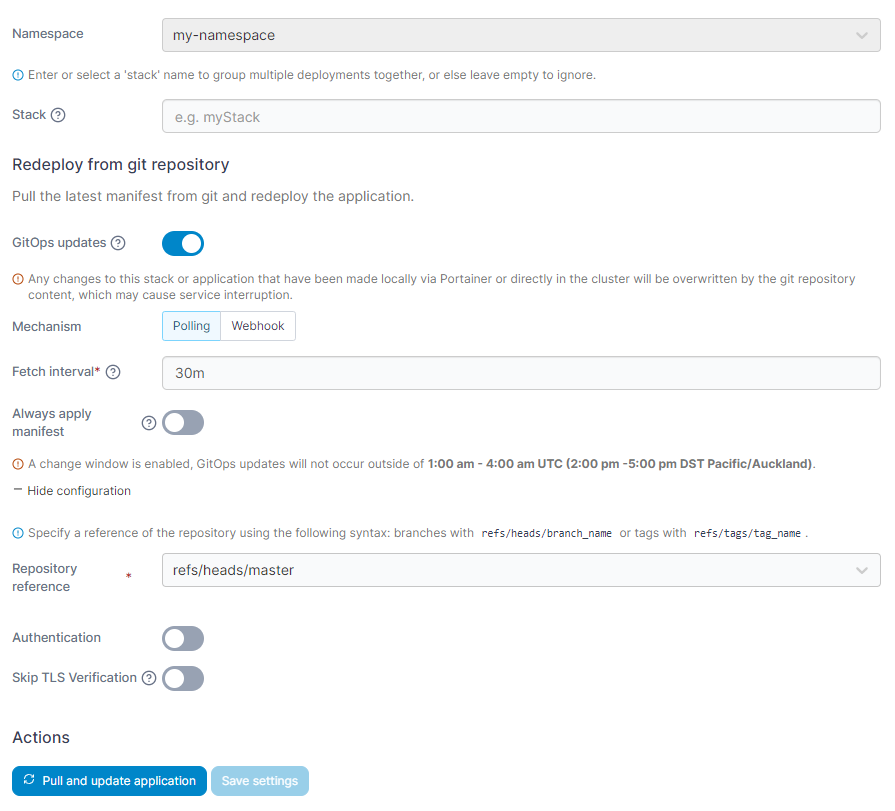
Portainer supports both patterns from the same interface. Operators can deploy directly for early-stage workloads, or connect a Git repository and let Portainer reconcile the cluster state to match the manifest, agentless and without a separate GitOps controller.
For AI teams pushing model updates into a governed environment, Portainer-Run sits on top of this. The AI team uploads or points at their app, Portainer-Run generates the Kubernetes manifest, commits it to the sanctioned Git repository, and the GitOps flow handles the rest. The AI team doesn't touch kubectl, and the platform team doesn't touch every deploy.
{{article-cta}}
Step #5: Verify, Expose, and Monitor
With the app deployed, confirm it’s serving. Check pod status and logs to make sure the container started cleanly, weights loaded, and the health endpoint responds. GPU utilization metrics are worth checking here, too; a pod running on CPU because GPU requests were misconfigured is a common silent failure.
Expose the endpoint through an ingress controller, a service mesh, or an API gateway, depending on the environment. For public traffic, terminate TLS at the ingress; for internal-only workloads, an internal load balancer is usually enough.
Wire up observability from day one:
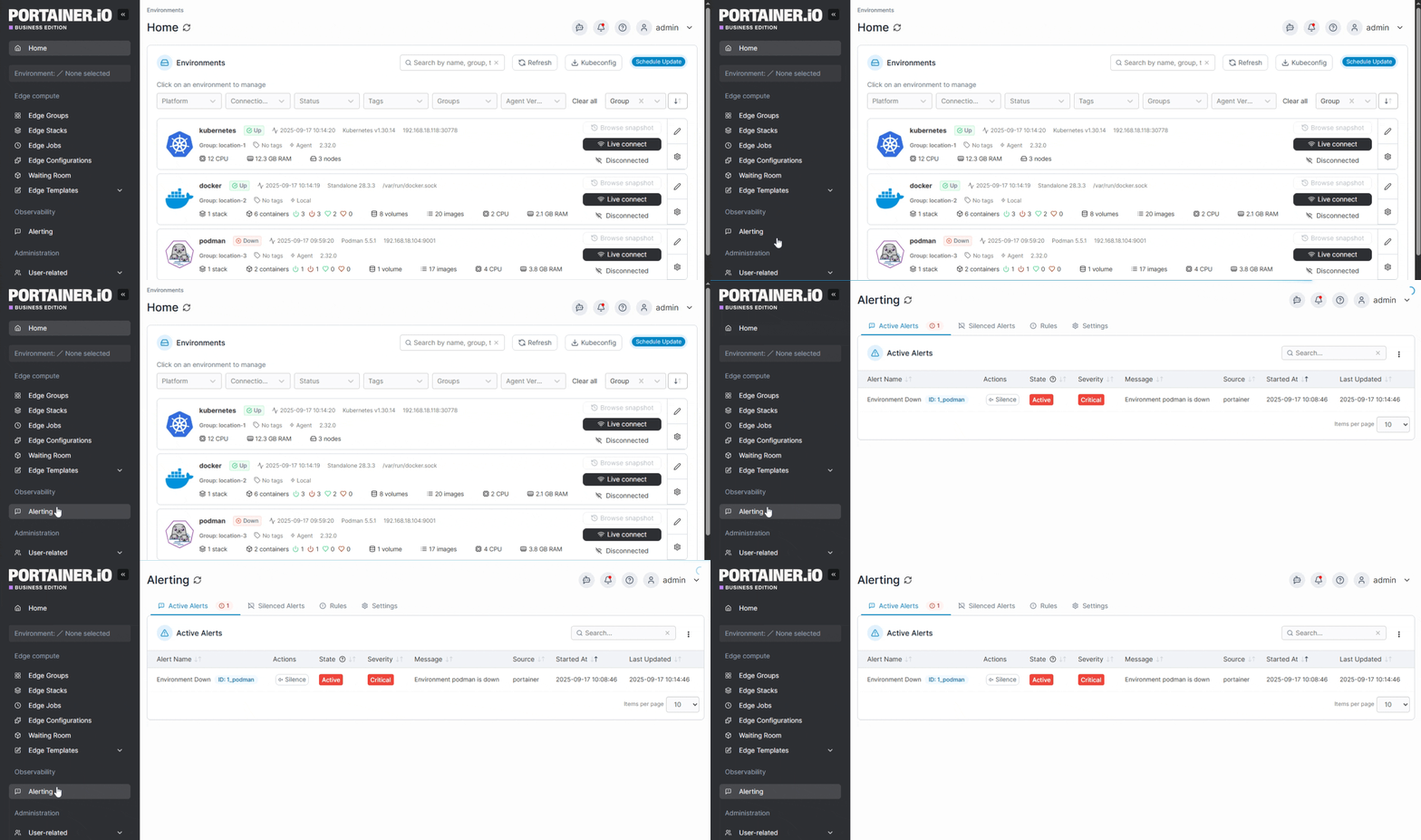
- Logs shipped to a central store (Loki, Elasticsearch, CloudWatch, or the platform's default).
- Metrics for request latency, throughput, GPU utilization, and token counts, scraped by Prometheus or the cloud provider's monitoring service.
- Alerts on error rate, p99 latency, and GPU saturation, so degradation surfaces before users notice.
Portainer surfaces logs, real-time metrics, and pod-level GPU state directly in the UI, which cuts the context-switching between kubectl, the cloud console, and a separate monitoring tool during rollouts.
Common Challenges When Deploying AI Apps
Moving an AI app from a working prototype to a governed production endpoint runs into a specific set of problems that don't show up in standard web app deployments. Here are some of the most common challenges while deploying AI apps:
- Cost visibility per workload. Inference bills accumulate across tokens, requests, GPU-hours, and storage tiers, which traditional cloud cost tools weren’t built for. Attributing spend to a feature or team gets hard fast.
- Right-sizing GPU hardware. Undersize the cluster and cold starts stretch and latencies spike; oversize it and expensive GPUs sit idle. Kubernetes hardware requirements for AI workloads are a different planning problem from standard node sizing.
- Inference log governance. Debugging logs capture prompts and responses that often carry PII or IP. They need scoping, redaction, and retention policies aligned with whatever compliance regime the app falls under.
- Model quality degradation over time. Model behavior drifts as user inputs, upstream data, or prompt templates change. Standard SRE monitoring watches infrastructure, which doesn’t help when the model stays available and returns worse answers.
- Testing and evaluation loops. Standard integration tests can’t validate LLM output because the same prompt can return different responses. Teams need evaluation pipelines with ground truth data and regression tracking alongside normal CI.
- Security surface unique to AI apps. Prompt injection, model extraction through inference APIs, and adversarial inputs are attack patterns that don't map to standard container security best practices.
- Shadow AI deployments. Non-technical teams spin up AI apps through AI coding tools and dev sandboxes, then move them into production without going through platform engineering. Enterprises end up with unsanctioned AI workloads sitting outside the governance model.
The longer an AI app runs, the more these problems compound, which is why the work doesn’t end at deployment.
Managing and Updating AI Apps After They Go Live
Deployment is just the beginning. Keeping AI apps updated, governed, and consistent as they multiply across teams, environments, and customers requires deliberate operational discipline. Here’s how to think about it:
- Controlled updates and rollback. New model versions arrive as new container images, and every update needs a reviewed rollout with a clean rollback path. GitOps and Kubernetes automation put every deploy through Git, which makes changes auditable and reversible. Portainer runs this from the operator UI, so a bad deploy rolls back to the previous image in one click.
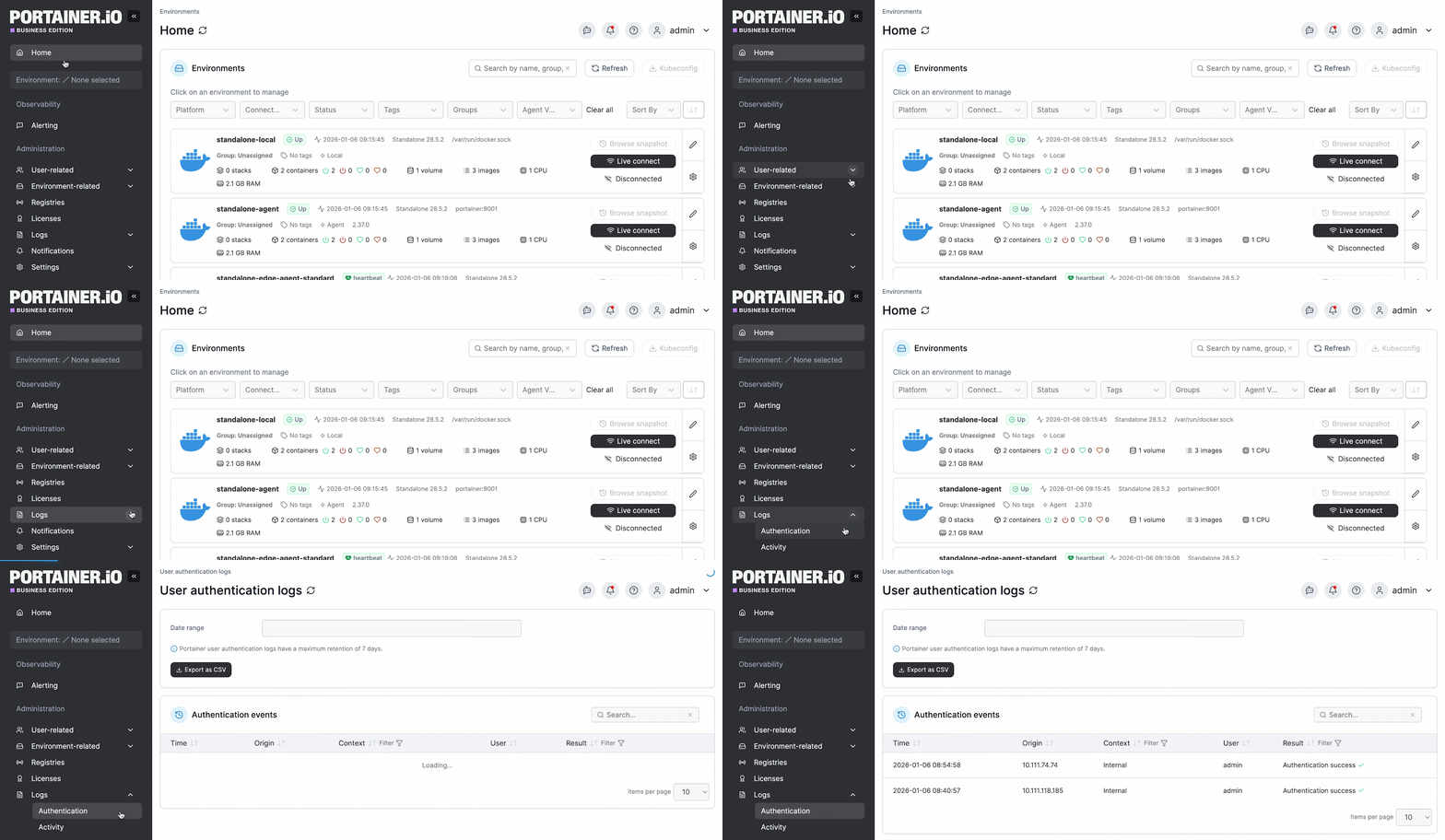
- Least-privilege access control. AI teams push model updates, platform teams own the cluster, and auditors need a record of who did what. Portainer applies RBAC per-namespace and per-cluster with LDAP or SSO integration, and every action feeds an audit log that streams to Splunk, Sentinel, or a SIEM of choice.
- Fleet-wide consistency. Policy drift and version sprawl show up fast when AI apps run across a mix of cloud, on-prem, and edge clusters. Portainer’s Kubernetes multi-cluster management and fleet device management capabilities apply the same policy, registries, and security constraints across every environment.
Here’s what this looks like in practice. Machina, a European software company specializing in grant, case, and application management systems, integrates in-house AI components across multiple customer-specific instances.
With a team of 20 developers, AI engineers, and DevOps supporting AI rollouts across Docker environments, the manual side had become a bottleneck: deploying AI container updates took each engineer 1-2 hours daily, errors blocked testing iteration, and the tight coupling between developers and DevOps slowed feature delivery.
After adopting Portainer, automated CI/GitOps deployments cut daily deployment time from 1-2 hours to 5-10 minutes, a whopping 95% efficiency gain.
Self-service deployment removed the constant back-and-forth with operations, and OAuth-based RBAC centralized access control across the growing team. The company reclaimed hundreds of person-hours annually (~$340K in savings).
Deploy AI Apps with Confidence Using Portainer
Deploying an AI app is a completely different problem from deploying a standard web service. It involves GPU dependencies, large model artifacts, inference-heavy cost profiles, stateful retrieval layers, compliance surfaces, and update workflows that all shape the operational reality of getting an app to production and keeping it healthy there.
Portainer gives operators the control plane to manage containerized AI workloads across Kubernetes, Docker, and Swarm environments, whether they run in the cloud, on-prem, hybrid, or at the edge. Portainer-Run layers a self-service portal on top so AI teams can push model updates into governed clusters through sanctioned Git repos, without needing direct cluster access.
Want to see how Portainer handles AI app deployment in your environment? Schedule a demo with our technical team.
FAQs
1. What does it mean to deploy an AI app?
Deploying an AI app means packaging the trained model and its serving code into a container, then running it on infrastructure that can serve real users at production latency, cost, and reliability.
2. How do you deploy an AI app to production?
Package the model and serving code into a container image, prepare a GPU-enabled Kubernetes environment, configure secrets and resource requests, and deploy through a control plane UI or a GitOps pipeline.
3. What is the best way to deploy AI models?
It depends on your constraints. Self-hosted containerized deployment on Kubernetes gives the most control, portability, and cost predictability for regulated data or high-volume workloads. Managed AI platforms suit prototypes and low-ops teams.
4. Can you deploy AI apps at the edge?
Yes. Small language models, distilled models, and vision models run well on edge hardware in factories, retail sites, and remote infrastructure, with tools like Portainer Edge Agent managing containerized workloads across distributed fleets.
5. Do you need Kubernetes to deploy AI apps?
No, but it’s the most common route for production. Managed AI platforms and containers-as-a-service options work for smaller workloads, while Kubernetes has become the default for anything with GPU, scaling, or governance requirements.
6. How long does it take to deploy an AI app?
It varies. A prototype on a managed AI platform can be live in hours. A production-grade containerized deployment on Kubernetes with GPU, RBAC, and GitOps takes days to weeks, depending on how much of the infrastructure is already in place.
7. Should you use managed Kubernetes like EKS or AKS for AI apps, or run it on-prem?
It depends on data residency, cost profile, and platform maturity. Managed Kubernetes suits teams with existing cloud commitments and no strict on-prem requirements. Self-hosted or on-prem suits regulated data, high inference volume where GPU costs compound in the cloud, and organizations that want deployment patterns to work identically across environments. Portainer manages EKS, GKE, AKS, and self-hosted clusters from the same interface, so teams running a mix of managed and on-prem Kubernetes get a consistent operator experience without having to pick one route over the other.
8. Do you need Prometheus and Grafana to monitor AI apps on Kubernetes?
No. Any monitoring stack that captures request latency, throughput, GPU utilization, and error rates works. Prometheus and Grafana are the common choice because they're standard in most Kubernetes stacks and integrate with alerting tools, but managed monitoring from AWS, GCP, or Azure covers the same ground for cloud-hosted workloads. Portainer surfaces pod-level metrics and GPU state directly in its UI and exposes the same data via API to feed Prometheus, Grafana, or whatever external observability stack the team already runs.
One platform, not twelve tools.
Govern Kubernetes across your whole fleet from a single control plane. Get 3 nodes free.
Get 3 nodes freeTalk to technical sales